
Chinese handwriting & stroke order
Learn to write
Chinese.
Hanzi Stroke is a Chinese handwriting app for iPhone and iPad. Follow stroke order, practice writing from memory, and learn simplified Chinese characters through HSK-based writing lessons. Try five characters online, then continue with offline practice in the app.
For iPhone & iPad · Free to download

A little practice,
a little more confidence.
Start at the red dot. Follow the stroke.
Real stroke paths. A small taste of the app.

Then the next.
From “where do I start?”
to “I wrote that.”
Chinese characters become more familiar when you write them. Hanzi Stroke gives every practice a clear next step.
See the order
Watch the strokes unfold. Know where to begin and which direction to go.
Find your rhythm
Trace the character, then write it yourself. Get feedback on the strokes that need attention.
Make it stick
Write from memory and return for spaced review. Keep building on what you’ve learned.
A clear path.
A little every day.
Pick up where you left off, with a daily plan that brings new characters and review together.
Learn with a pathFollow structured HSK 2.0 and 3.0 writing courses, one lesson at a time.
Connect the dotsExplore pinyin, meanings and example sentences alongside each word.
See your progressWatch your practice grow across iPhone and iPad with iCloud sync.


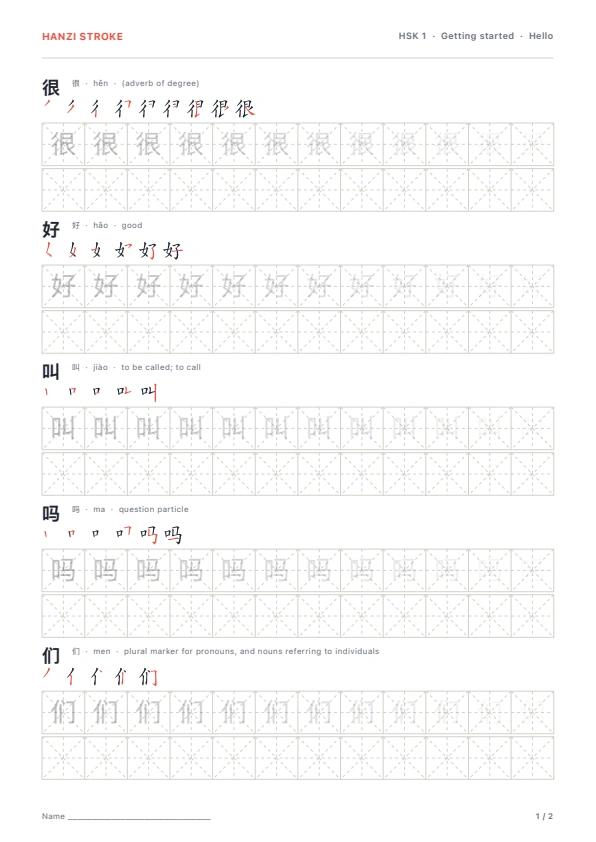
A Chinese worksheet.
Ready to print.
Start with “Hello”, the first lesson in Getting started. Download the app’s real workbook with stroke order, tracing and writing practice for all 10 characters.
Get the free worksheetPreview the Hello lesson worksheet
3-page PDF · A4 · HSK 3.0 Level 1 · No sign-up
Chinese stroke order, step by step.
Start with five useful characters. Explore the stroke order guides
Build your handwriting practice.
Use a guide, then try the same character from memory. See what the app includes.
A few things
you might wonder.
Getting started should feel simple.
I’m a complete beginner. Can I start here?
Yes. Try a character on this page, then start with guided lessons in the app. You can follow each stroke, learn the pinyin and meaning, and build up to writing from memory.
Is Hanzi Stroke free?
The app is free to download and includes a limited free learning experience. Pro unlocks more practice and learning tools. Current plans and prices are shown in the app, in your local currency.
Does it work on iPhone and iPad?
Yes. Write with your finger on iPhone, or use a finger or Apple Pencil on a compatible iPad. Learning records can sync between your devices with iCloud.
Can I study offline?
Core learning content works offline in the app. Download the app while connected, then practice wherever you are. iCloud sync and purchases need an internet connection.
Which Chinese characters does it teach?
Hanzi Stroke focuses on simplified Chinese, with writing courses aligned to HSK 2.0 and HSK 3.0. You’ll also find pinyin, meanings and example sentences to connect writing with vocabulary.
How is the web practice different from the app?
This page offers a small, guided trace demo with five characters. The app adds structured courses, stroke-level writing feedback, spaced review, progress tracking and printable workbooks.
Your next character
is waiting.
Find a few minutes. Make a few strokes.
Build a practice you can come back to.
iPhone & iPad · Free download, optional Pro

Scan to start writing